Has your building shown its true colours yet?
23 September 2026

Whether you’re building a house with a red roof, working on a green landscape or looking for the finishing touch for a car you’ve designed yourself, the colour is set – but which parts can you use to achieve it? By searching for LEGO® parts by colour, you’ll also discover shapes and building possibilities you hadn’t thought of before.
At ToyPro, you can filter the range of individual LEGO® pieces by colour. This is handy if you’re looking for something specific, and also if you want to find inspiration for your next building project.
How to filter LEGO® parts by colour at ToyPro
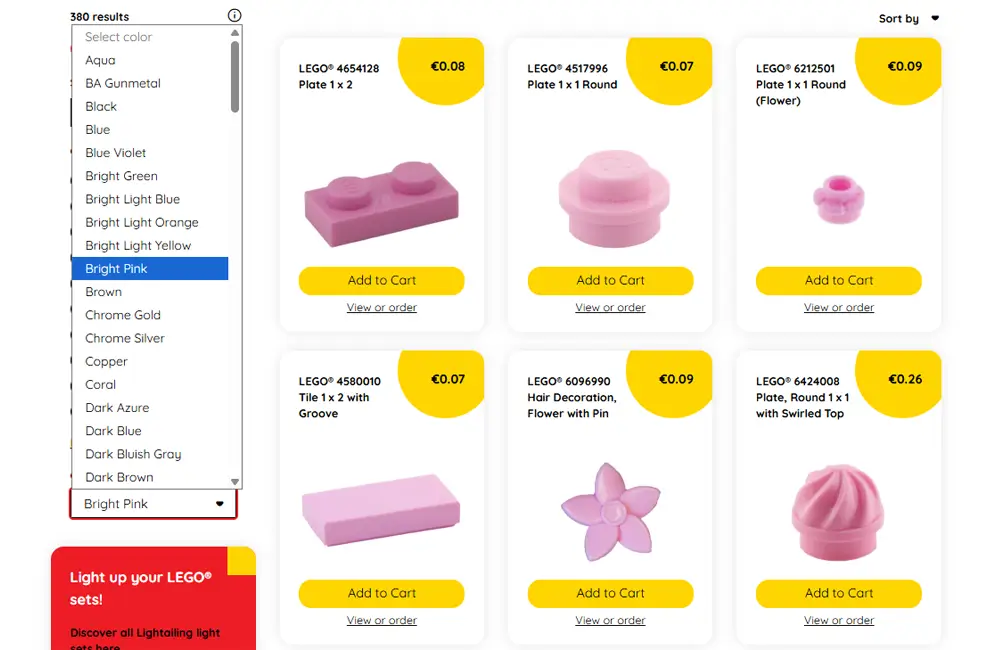
You don’t need to know a part number to get started. With the colour filter, you can explore the range based on the colour you need:
- Go to the parts page. Start with the full overview if you want to discover as many different shapes as possible.
- Under ‘Colour’, select the colour you want. Use the colour selection in the filters to do this.
- View the results. Look for parts that suit your building idea and be surprised by shapes you haven’t seen before.
- If necessary, refine your search by category. Choose, for example, bricks, slabs or roof tiles. Depending on the category, you can filter further by sub-category or size.
Tip: do you want to discover new pieces? Then start by selecting just a colour. The more specific your search is from the outset, the less likely you are to come across an unexpectedly useful piece.
Discover pieces you didn’t know about
When building, it’s easy to fall back on familiar bricks. That makes sense: you know how they fit together and what you can make with them. But sometimes a design actually gains more character from a piece you’ve never used before.
Imagine this: you’re looking for pieces for the façade of a house. You’ve already chosen a colour and are thinking of standard rectangular bricks. Whilst browsing, you might spot a round shape that’s perfect for a column, or a slanted piece that you can use to create a detail above the front door.
That’s what makes searching by colour so much fun. You give yourself a single starting point, whilst the shape remains open to interpretation. This way, you can discover new components and use familiar ones in a different way.
From colour to building idea: three ways to get started
Give a roof more character
A roof largely determines the look of a LEGO® house. Think about the shape in advance: do you want a steep roof, a low extension or a small dormer window?
Next, take a look at the LEGO® roof tiles and select your preferred colour. Compare the shapes and dimensions you come across. Perhaps a different pitch will give you a better idea for your design.
Create a more varied landscape
A park, woodland garden or fantasy landscape becomes more interesting when you vary the height and shape. Use a colour as your starting point and think about which parts can serve as vegetation, ground cover or decoration.
You can search specifically for LEGO® plant pieces. Or take a look at pieces from other categories: a shape can sometimes take on a completely different function once you place it in a landscape.
Develop your own single-colour design
Are you building your own creation, also known as a MOC? Then try designing a small model with a single main colour. Think of a miniature vehicle, a piece of furniture or a fantasy creature.
By sticking to one colour, you’ll naturally start to pay closer attention to silhouette, proportions and details. Which rounded shape suits your design? Where could an angled brick break up a straight line? The colour filter helps you find compatible bricks.
Explore first, then choose with purpose
Have you found an interesting part? Then think about how you want to use it. Pay attention to the dimensions, the connection points and the space it takes up in your build. A lovely shape is only truly useful if it also fits into your construction.
Before ordering, check the colour you’ve chosen and its availability. Would you like to know how to search specifically by part number or set number? Then read our guide on searching and ordering at ToyPro.
What parts will you discover in your favourite colour?
A colour can be the start of a completely new building idea. So why not take some time to browse without a set list in mind? You might find exactly the detail your build was missing, or a shape that inspires you to create something new.
Browse the LEGO® parts at ToyPro, select the colour you need and discover what you can build with them.
Discover all Lightailing light sets here

Receive the weekly ToyPro newsletter and stay up to date on the latest news about ToyPro and LEGO®, MOCs and much more. Discover LEGO®
Successful! ToyPro will keep you updated from now on. Welcome to the club.