Make Your Own LEGO® Advent Calendar: 24 Days of Building Fun
14 October 2026
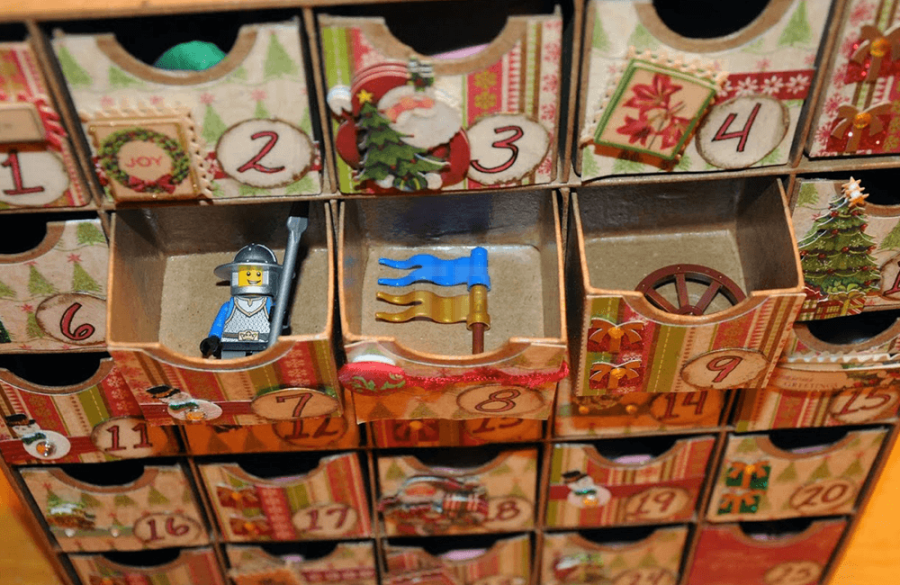
Would you like to make your own LEGO® Advent calendar this year? With 24 numbered pouches or boxes and carefully selected LEGO® pieces, you can create a personalized surprise for December. You decide on the theme, the contents, and the size of each day’s building challenge.
October and November are great months to get started. That way, you’ll have time to try out ideas, gather pieces, and distribute the surprises. At ToyPro, you can choose individual LEGO® pieces for your homemade calendar.
Choose one story for all 24 days
An Advent calendar is even more fun when the pieces come together to form something. Think of a small shopping street, an animal enclosure, or a winter market. A new piece is added each day, so that by December 24, the recipient has built a complete scene.
For a winter market, you can start with a base and a simple stall. Next, add a counter, a bench, decorations, and small items for sale. You don’t have to hide a large structure every day. A small accessory with a fun challenge can also be part of the story.
Make sure all the necessary parts are included in the calendar. For a challenge that builds on a previous structure, you can indicate on the card which part of the market is being expanded. This prevents the building fun from coming to a halt on day three due to a missing piece.
Small LEGO® pieces as Advent calendar fillers
Loose food items go well with a DIY market. A red apple and a yellow banana can make up the first stock for a fruit stand. A croissant also gives a small bakery something to sell right away.
It’s best to include such accessories along with a task. For example: “Build a crate for the fruit vendor today” or “Make a counter for the baker.” Include the necessary building blocks with the accessories so the recipient can get started right away.
These small parts are examples of Advent calendar fillers. Together, they do not form a complete building set or a ready-made calendar.


Build a new market stall from just a few pieces
A second food stall gives the market its own unique character. Combine a LEGO® hot dog with the matching bun and add building bricks to create a small sales counter. A round tile with a cookie pattern can then become the first treat at a cookie stand.
Preferably, put parts that together form a single accessory in the same bag. For example, the hot dog and the bun together create a ready-to-use set. That feels like a complete surprise, even when the number of parts is small.
You can repeat the same idea on different days: first the stand, then the products, and finally a place where visitors can sit. This way, the story evolves without every day feeling the same.


Here’s how to spread out your Advent calendar over 24 days
First, write down all the surprises before you fill the bags. A simple layout for a DIY winter market is:
- - Days 1 through 6: Build the ground, a path, and the base of the first stall.
- - Days 7 through 12: Add the counter, merchandise, and a second stall.
- - Days 13 through 18: Create a seating area, extra decorations, and small details for the square.
- - Days 19 through 23: Add minifigures as visitors and expand the market with personal building projects.
- - Day 24: Add the final decoration or a specially chosen figure to complete the scene.
This is a framework for you to develop on your own—not a building instruction with a fixed parts list. Test each small structure beforehand and take a photo of it if possible. You can place that photo in the corresponding bag as an example.
Keep the budget and contents organized
You don’t need 24 complete sets to fill a LEGO® Advent calendar. Put together the contents using individual bricks, accessories, and a few minifigures that fit the chosen theme. This way, you decide how many pieces each surprise contains and how you allocate your budget.
Calculate the total cost in advance, including the bags or boxes. Then divide the contents among all the days. Alternate a building challenge with multiple bricks with a smaller accessory, so you don’t discover halfway through that all the special surprises have already been packed away.
Write down which pieces go in each bag for each day. Then lay out the 24 portions side by side and double-check them before sealing everything. That’s a lot easier than searching on December 12 for the piece that accidentally ended up behind number 21.
Who are you making the LEGO® Advent calendar for?
Tailor the challenges to the recipient. For a beginner builder, small, clear examples are helpful. An experienced builder, on the other hand, might enjoy an open-ended challenge, such as designing a market stall using the pieces from the bag.
Start early on your own LEGO® Advent calendar
A homemade calendar is especially fun because you can personalize it. Choose a favorite color, include a recognizable little shop, or add a card with a small building challenge. Then the countdown can begin right away on December 1.
Check out the LEGO® food assortment and all individual LEGO® pieces at ToyPro. Put together the contents of your calendar and turn 24 little surprises into your very own building world.
Discover all Lightailing light sets here

Receive the weekly ToyPro newsletter and stay up to date on the latest news about ToyPro and LEGO®, MOCs and much more. Discover LEGO®
Successful! ToyPro will keep you updated from now on. Welcome to the club.